Commentary can contain anything expressible in Markdown notation. The dialect of Markdown used by Inweb is Github-flavored Markdown, an extension of Common Markdown which also supports (for example) tables and to-do lists, extended further to allow mathematics and footnotes. So it's quite flexible. There are many online guides to Markdown, but here are the main points:
Headings. Markdown has six levels of subheading, denoted # to ######. The top two
levels are meaningful to Inweb. The highest level, #, should be used only
on the opening line of a file, and to write the title text:
# Heapsort by J. W. J. Williams
After that, the file can contain any number of ## subheadings. Inweb uses
these when breaking the material into "paragraphs", and renders them neatly
when weaving the web. For example, a file of 500 lines might sensibly be
broken up with five or six subheadings like this one:
## Some Initialization
Lesser subheadings are ignored by Inweb, or rather, are treated as commentary features like any other: they're probably best not used, but chacun à son goût.
Character set. Inweb uses Unicode throughout and expects files to be encoded as UTF-8. This means that the commentary in a web can freely use non-ASCII characters, like this:
Chacun à son goût, as the French say.
Older compilers and interpreters may not accept Unicode in their source code, but the tangled output from a web will only contain what characters we use in the holons, not the commentary. So this web:
Περσέων μέν νυν οἱ λόγιοι Φοίνικας αἰτίους φασί γενέσθαι τῆς διαφορῆς.

	phoenicians.angry = true;
tangles to a program containing no Greek characters, since those were only present in the commentary.
Styling of text. The following:
* Code can be written in `backticks` like so.

* _Emphasis_ and **strong emphasis** are technically not the same thing as
  italics and boldface, but are often rendered that way.

* ~Strikethrough~ if a word displeases you.
renders as:
-
Code can be written in
backtickslike so. -
Emphasis and strong emphasis are technically not the same thing as italics and boldface, but are often rendered that way.
-
Strikethroughif a word displeases you.
The full rules on how to resolve complex interlacings of these notations are too arcane to give here. Inweb follows Common Markdown precisely, and passes all of its test cases. A few cases come up often-ish:
-
this_is_not_emphasisdoes not produce emphasis because the underscore characters_are not at word boundaries. It produces this_is_not_emphasis. -
_escaped\_underscore_uses a backslash\_to mean "really an_, not the end of the current emphasis run". The result is escaped_underscore. -
``insignificant`backtick``uses doubled backticks so that the inner backtick is not treated as the end of the code matter. The result isinsignificant`backtick. If you're curious as to how to get``insignificant`backtick``to appear, the answer is``` ``insignificant`backtick`` ```, and this really ought to cure your curiosity.
Lists. Lists are indicated with bullets. This:
A tight list has less vertical space between the items. Both sorts can have
nested sub-lists.
* First item.
* Second item.
   * Nested item 1.
   * Nested item 2.
* Third item.
Comes out as:
A tight list has less vertical space between the items. Both sorts can have nested sub-lists.
- First item.
- Second item.
- Nested item 1.
- Nested item 2.
- Third item.
It's also possible to have a numbered list:
1. First item.
2. Second item.
   * Nested item 1.
   * Nested item 2.
3. Third item.
...though a quaint "feature" of Markdown is that it ignores the numbers actually used in the text, and applies its own counting from 1; so if you write a list numbered as 3, 4, 5, it will still come out as 1, 2, 3.
- First item.
- Second item.
- Nested item 1.
- Nested item 2.
- Third item.
Code shown in commentary. Short code extracts can be backticked (see above).
In most uses of Markdown, longer code extracts would be indented by one tab
stop, but we can't do that here, because if we did then the code would become
part of the program. Instead we use an alternate Markdown notation, "fences":
```
int strangiato(int villa) {
    return 0;
}
```
producing:
int strangiato(int villa) {
    return 0;
}
As in regular Markdown, a programming language can be specified, telling Inweb how to syntax-colour the result:
int strangiato(int villa) {
    return 0;
}
The language has to be one which Inweb knows about, but Inweb can easily be taught about new languages as needed: see About Languages.
Links. Links in the web-page sense are written with square and then round brackets in Markdown:
[this text is highlighted](https://en.wikipedia.org/wiki/Highlights_(band))
produces: this text is highlighted.
Inweb pre-populates the Markdown links dictionary in such a way that if a web
has multiple sections then the names of those sections can be used as self-contained
links. For example, if a web has a section called "Gold-Digging Ants", then from
anywhere in the web, the link [Gold-Digging Ants] will produce the words
"Gold-Digging Ants" and also link them to the relevant section. Alternatively,
to provide different text which is still linked there:
Some defend [Herodotus's more improbable claims](Gold-Digging Ants).
For this to work, the section name can't be a positive number, because that would be read instead as a footnote (see below).
Mathematics. The usual reason to dip into mathematics notation in program commentary is to agonise over running time, like so:
Though it is often said that sorting algorithms cannot run faster than $O(n\log n)$
time when sorting $n$ items, this is only true for comparison-based sorting, and
counting sort trades memory for time in order to run in $O(n+k)$ time, where $k$
is the maximum value of the items being sorted.
Here the mathematics $n$, $O(n\log n)$, and such are written in TeX notation,
and sandwiched in between dollar signs $. This produces \INWEBMATH(n\INWEBMATH), \INWEBMATH(O(n\log n)\INWEBMATH) and so on,
and will be rendered in HTML using the TeX engine to produce a typeset fragment of
a page which is then displayed as an image. Longer, centred-on-the-page, formulae
can be displayed using doubled dollar signs $$, so $$ \Gamma(z) = \int_0^\infty t^{z-1}e^{-t} {\rm d}t $$
types a formula for the gamma function:
$$ \Gamma(z) = \int_0^\infty t^{z-1}e^{-t} {\rm d}t $$
All of this takes away the ability to use the dollar character for its own sake,
as in the phrase "Herodotus' Histories currently ship for $18.44 in paperback".
The trick is to write \$18.44 not $18.44, and the backslash then deactivates
the otherwise special behaviour of $. Of course, this then takes away the
backslash, but \\ then works. So /a little tent\\ produces /a little tent\.
Tables. See Github's documentation on writing tables in Markdown for more, but e.g.:
MS | Library                         | Shelfmark              | Century
-- | ------------------------------- | ---------------------- | ---------
A  | Laurentian                      | Plutei 70.03           | 10th
B  | Angelicanus                     |                        | 11th
D  | Vatican                         | gr 2369                | 10th/12th
R  | Vatican                         | gr 123                 | 14th
S  | Emmanuel College Library        | 'Sancroftianus'        | 14th
U  | Vatican                         | Urbinas 88             |
C  | Laurentian                      | conventi soppressi 207 | 11th
E  | Bibliotheque National de France | suppl. 134             | 13th
P  | Bibliotheque National de France | gr. 1633               | 14th
produces:
| MS | Library | Shelfmark | Century |
|---|---|---|---|
| A | Laurentian | Plutei 70.03 | 10th |
| B | Angelicanus | 11th | |
| D | Vatican | gr 2369 | 10th/12th |
| R | Vatican | gr 123 | 14th |
| S | Emmanuel College Library | 'Sancroftianus' | 14th |
| U | Vatican | Urbinas 88 | |
| C | Laurentian | conventi soppressi 207 | 11th |
| E | Bibliotheque National de France | suppl. 134 | 13th |
| P | Bibliotheque National de France | gr. 1633 | 14th |
Quotations.
"Those of the Persians who have knowledge of history declare that the Phoenicians first began the quarrel. These, they say, came from that which is called the Erythraian Sea to this of ours; and having settled in the land where they continue even now to dwell, set themselves forthwith to make long voyages by sea."
was produced by:
> "Those of the Persians who have knowledge of history declare that the
> Phoenicians first began the quarrel. These, they say, came from that which
> is called the Erythraian Sea to this of ours; and having settled in the land
> where they continue even now to dwell, set themselves forthwith to make
> long voyages by sea."
Note the running > marks, which are essential on each line. The quotation
marks " at the start and end here were on the other hand optional.
These are called block quotations, and they can contain all sorts of content: lists, tables, multiple paragraphs, and so on.
Tips and warnings. Inweb supports the GitHub convention on alerts, which are a special form of block quotation for informational notices. They look like this:
ⓘ Note
Useful information that users should know, even when skimming content.
☂ Tip
Helpful advice for doing things better or more easily.
☞ Important
Key information users need to know to achieve their goal.
⚠ Warning
Urgent info that needs immediate user attention to avoid problems.
⚠ Caution
Advises about risks or negative outcomes of certain actions.
and are produced by this:
> [!NOTE]
> Useful information that users should know, even when skimming content.

> [!TIP]
> Helpful advice for doing things better or more easily.

> [!IMPORTANT]
> Key information users need to know to achieve their goal.

> [!WARNING]
> Urgent info that needs immediate user attention to avoid problems.

> [!CAUTION]
> Advises about risks or negative outcomes of certain actions.
Ruled lines. Feel free to draw a line:
by means of:
Feel free to draw a line:

--- ---
Pictures. Traditional Markdown is .
This works fine, but is a little awkward because you need to know the relative
URL to whichever directory holds the images, and also, you need to put them there.
When Inweb renders Markdown images in a weave to HTML, then, there are two bonus
features. Firstly, if the image filename contains no slashes /, as in the
following example...
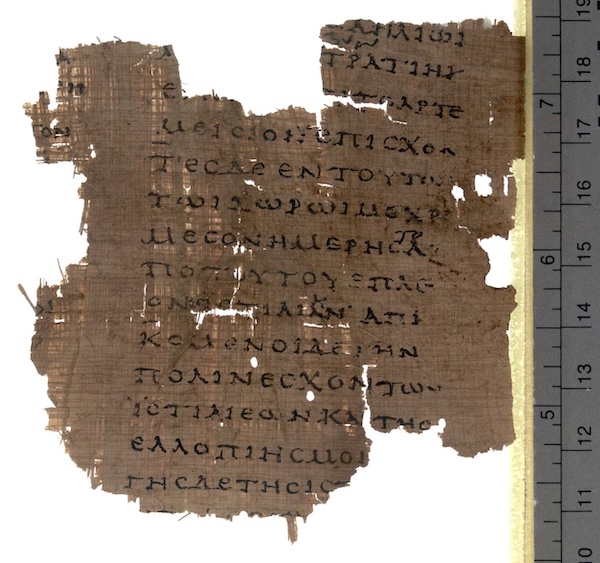
...then Inweb finds the image in the Figures subdirectory of the directory
containing the colony file, and automatically copies it to where it's needed.

Secondly, images can be resized, which regular Markdown image links would not allow:

produces:
And the text "fragment from book VIII on Papyrus Oxyrhynchus 2099" is used as the alt-text for the image, which will be shown by screen-readers.
Inserted text files. It's sometimes useful to be able to copy a text file
into the woven output: that is, to say "put the contents of the file whatever.txt
at this point". This is handled by an extension to Markdown like so:

This is intentionally the same syntax as for an image, because the text file
is treated like a sort of textual picture. The "alt-text" in square brackets
must be exactly the word text for this to work: and the contents of the file
are then pasted in without any syntax-colouring.
So, for example,  might produce the equivalent of:
``` None
The whitebait
opens its eye
in the net of the law
```
The further development:

does the same, but with the syntax-colouring conventions of LANGUAGE rather
than None.
Downloadable files. A similar extension to Markdown's normal way to write images can place a downloadable file link into the woven output. For example:

The alt-text in square brackets must begin download:, and then continue
with the caption for the file, that is, the brief description presented to
the reader saying what the file is.
Audio and video. We can put audio and video players into the woven commentary which will play files included in a web:


These filenames will be relative to the web's Audio and Video subdirectories
respectively. The players can be rescaled:


Or we can put in embedded audio or video players calling on external resources. In that case, the bracketed "links" are media ID numbers at the service in question.


The latter sets just the height (of the displayed waveform, that is — arguably music has width and not height, but SoundCloud thinks otherwise).
Carousels. A carousel is a slide-show of (usually but not always) figures; there's a set of slides with captions, only one of which is visible at a time.
* (carousel "Royal Albert Hall, London: King Crimson's 50th Anniversary Concert")

* (carousel "Brighton Beach")

* (carousel "Pula")

* (carousel "St Mark's Basilica, Venice")

Note that this is an unordered list in Markdown notation (that's what the *
bullets indicate): but if Inweb sees that every item in an unordered list
begins with a paragraph reading (carousel "CAPTION HERE"), then Inweb renders
the list as a carousel rather than simply a list of images one after another.
That carousel contained only figures, but almost any Markdown material can go into the slides. For example:
* (carousel "Stage 1 - Raw tree" captioned below)

	``` BoxArt
		ROOT ---> DOCUMENT
	```

* (carousel "Stage 2 - Developed tree" captioned below)

	``` BoxArt
		ROOT ---> DOCUMENT
					|
				  NODE 1  ---  NODE 2  ---  NODE 3  --- ...
	```

* (carousel "Stage 3 - Completed tree" captioned below)

	``` BoxArt
		ROOT ---> DOCUMENT
					|
				  NODE 1  ---  NODE 2  ---  NODE 3  --- ...
					|            |            |
				  text 1       text 2       text 3  ...
	```
Note the optional captioned below; captioned above is also allowed. By
default, the caption for a carousel slide stylishly overlies the bottom of
the content, but while that's good for pictures, it obstructs the view of
diagrams like these. So:
Carousels can also have slides with no caption at all:
* (carousel)

* (carousel)

Embedded HTML. This splices in some raw HTML code from a file in the web's
HTML subdirectory, assuming it has one:

Footnotes. These add a certain style to commentary,1 and can be used to supply trivia.2 That last sentence was typed as:
These add a certain style to commentary,[1] and can be used to supply
trivia.[2]

[1] Some would say.

[2] Herodotus was born not far from the site of the future Tomb of Mausolus, one of
the seven wonders of the ancient world, from which the word _mausoleum_ derives.
Square brackets in Markdown ordinarily mean links. They do here, too: what is going on is that a link whose text and address are both the same, and are both a positive integer of 1 to 9 digits, is read as being a link to the footnote of that number. Javascript (if running) then presents the result as a pop-up. In each paragraph there must be an equal number of cues as there are notes, and both numberings must be continguous. In other words, they have to match perfectly. Footnote texts must be the final things in the paragraph.
In the web as typed, footnote numbering begins again at 1 in each paragraph. As rendered, though, the notes are renumbered throughout the page they're on: this happens automatically.